


AirTalk Wireless
4.66.83K Reviews
App Specs
- Version
- 2.8.4
- Updated On
- License
- Free
- Downloads
- 1,000,000+
- Developer
- HTH Communications
- Categories
- Business
- Platform
- Android, iOS
Screenshots





 Analysis by AppCompare
I judge a wireless-service app by how much work it removes from the ordinary chores: checking an account, keeping track of usage and knowing where to turn when something needs attention. AirTalk Wireless is a free business app from HTH Communications, and its purpose is practical rather than flashy: it gives customers a place to manage their wireless service from a phone. That can be useful when you want account tasks close at hand, though the app is most valuable if you already use AirTalk Wireless service.
Start with the account, not the menus
My first piece of advice is to treat setup as the one step that deserves patience. Linking an existing account took longer than I expected, so I wouldn’t begin the process while rushing out the door or relying on an urgent account change. Have the information you normally use to access your service ready, follow the prompts carefully, and give the connection time to finish before trying the same step repeatedly. Once the account is connected, routine checks are more convenient than returning to a browser or searching through old messages.
That distinction matters because this isn’t a general-purpose calling or messaging app. It’s an account-management companion for wireless service. If you’re deciding between it and your phone’s built-in settings, think of the two as serving different jobs: device settings help you control the handset, while this app is intended to help you manage the service tied to your AirTalk account. For someone who only wants to see whether the phone is connected to Wi-Fi, opening this app would be unnecessary; for checking service usage or handling an account task, it has a clearer role.
A routine that makes account checks useful
I’d use it as part of a small, repeatable habit rather than opening it only when something goes wrong. For example, after a busy week of video calls, maps and browsing, I’d check usage and make a note of whether my normal pattern is changing. Before a trip or a week with more time away from Wi-Fi, that check can help me think ahead instead of discovering a concern at an inconvenient moment. I’d also review account details after making a change, so I know whether the service information I expected to see is actually reflected in the account.
This kind of routine is especially helpful when a phone is shared or several people in a household rely on the same person to keep track of service. A quick account check can make a conversation about usage more concrete than guessing from general phone activity. The useful habit is to check at a consistent moment—perhaps when reviewing other household bills—rather than repeatedly refreshing the app. That keeps account management deliberate and reduces the chance of mistaking a normal delay in updated information for a service problem.
AirTalk Wireless has a 4.5 average from around 37,000 ratings, and it has passed a million installs. Those figures suggest that plenty of people are using it, but they don’t tell me whether it fits every customer’s needs. I’d put more weight on whether you want account tools on your phone and whether the setup works smoothly for your own account.
Check the practical details before you depend on alerts
Alerts can be helpful, but I wouldn’t make them my only safeguard. If you use notifications, take a moment to check the app’s notification settings on your phone and make sure they suit the reminders you want to receive. Then keep a backup habit for anything important, such as checking the account before a payment deadline or before a period when you expect heavier use. A notification is a prompt, not a substitute for knowing where your account stands.
Worth Reading Before You Choose

EA SPORTS FC Mobile 26 Is a Bigger Football Game, but It Takes Time

Flipboard Shows What News Apps Must Do Beyond the Feed

Switching to Android Auto Means Rethinking Your Driving Routine

Google Calendar Makes a Crowded Week Easier to Manage

Ludo King Makes the Most of the Minutes Between Plans

Baby Panda World Brings Quick Play to Modern Phones, but Its Game Library Feels Busy
There’s a useful trade-off here: reminders can spare you from having to remember every check yourself, but too many alerts can fade into background noise. I’d keep only the ones that help with a real decision and avoid treating every message as an emergency. If you share responsibility for a line with someone else, agree on who will monitor account notices; two people assuming the other person is handling them is an easy way for a simple task to be missed.
The app is listed for everyone and requires Android 7.0 or later. It is free, and version 2.7.6 is the current version. I’d still check compatibility on the device you plan to use and install updates when available, particularly if you run into a setup or sign-in problem. Those are sensible checks for an account app, not a guarantee that every device or account workflow will behave identically.
Where the app helps—and where another route may be better
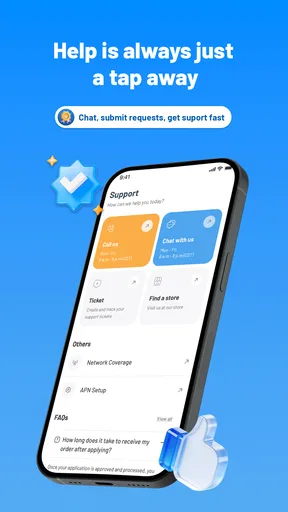
Compared with managing wireless service through a mobile browser, an account app can be quicker to reach when you’re already using your phone. The organized support area, with FAQs and a contact option, also gives you a place to look when a routine task becomes confusing. Compared with your phone’s general settings, however, it is narrower: it concerns AirTalk service rather than every connection or device preference. And compared with contacting support directly, self-service is convenient only when the question is straightforward enough for the available account tools or help material.
That’s why I wouldn’t recommend relying on the app as the answer to every service issue. If a problem is urgent, unclear, or not resolved by checking your account and the support section, use the contact route rather than repeating the same taps and hoping for a different result. The app can help you organize the first checks, but it cannot make a complicated account question simple just by putting it on a screen.
There are also reasons some people should skip it. If you don’t have AirTalk Wireless service, its account-management purpose gives you little reason to install it. If you strongly prefer handling everything on a computer, or you rarely need to review your wireless account, a phone app may add little to your routine. And if you expect a wireless app to improve reception or act as a general device troubleshooter, this is the wrong tool for that expectation.
What’s the Buzz About?
Before downloading AirTalk Wireless, I had heard a lot about its features and how it’s changing the way we manage our communication services. The app is designed to make managing your wireless service more intuitive and hassle-free. But is it as good as they say?
First Impressions
Downloading the app from the Play Store was a breeze. It’s got a sleek, modern interface that doesn’t overwhelm you with too many options right off the bat. The layout is clean and user-friendly, making it super easy to navigate, even if you’re not a tech whiz.
Features That Stand Out
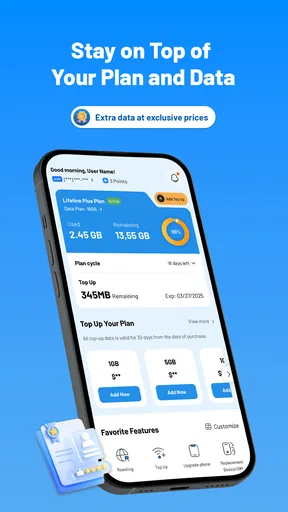
One of the first things I noticed was how AirTalk Wireless lets you manage multiple lines from a single account. This is a game changer for families or businesses that don’t want to juggle different accounts. You can quickly check your usage, pay bills, and even upgrade your plan directly from the app.
The app also offers a feature to set up alerts and notifications, which is pretty handy. You won’t have to worry about missing payment deadlines or exceeding your data limit. It’s like having a personal assistant reminding you about all the important stuff.
User Experience
Using AirTalk Wireless feels seamless. The app is responsive and doesn’t lag, which is a huge plus. The support section is well-organized, offering FAQs and a contact option if you need further assistance. It’s clear the developers put a lot of thought into making the user experience as smooth as possible.
One small hiccup I encountered was during the initial setup. Syncing my existing account took a bit longer than expected, but once it was done, everything worked perfectly. It might just be a one-off issue, but it’s worth mentioning.
Security and Privacy
In today’s digital age, security is everything, right? AirTalk Wireless uses encryption to ensure your data is safe and secure. The app asks for minimal personal information, so you won’t feel like you’re sharing too much. It’s reassuring to know they’ve got security covered.
Should You Try It?
So, here comes the million-dollar question: is AirTalk Wireless worth it? If you’re looking for a straightforward, efficient way to manage your wireless services, I’d say give it a shot. The app’s features are robust without being overwhelming, and it genuinely makes managing your service more convenient.
Of course, like any app, it might have its occasional glitches, but nothing that’s a deal-breaker. Plus, with ongoing updates, improvements are always on the horizon.
So, what are you waiting for? If you’re curious, head over to your app store, download it, and see how AirTalk Wireless can simplify your life. Happy chatting!
Pros
- User-friendly interface for easy navigation.
- Affordable plans with flexible options.
- Strong network coverage in most areas.
- No contract required
- offering flexibility.
- Responsive customer support team.
Cons
- Limited international roaming options.
- Data speeds may vary in rural areas.
- No family plan discounts available.
- Device selection is somewhat limited.
- Occasional app performance issues.
FAQs for AirTalk Wireless
What is AirTalk Wireless and how does it work?
AirTalk Wireless is a mobile application that offers free and discounted wireless services to eligible individuals. It works by providing access to a variety of voice, text, and data plans under the Lifeline Assistance program. Users can access features like call management, bill monitoring, and customer support directly through the app.
Who is eligible to use AirTalk Wireless services?
Eligibility for AirTalk Wireless services is primarily determined by participation in government assistance programs like SNAP, Medicaid, or Supplemental Security Income (SSI). Additionally, individuals may qualify based on their income level, typically if it is at or below 135% of the federal poverty guidelines. Verification is required to confirm eligibility.
What features does the AirTalk Wireless app offer?
The AirTalk Wireless app offers a variety of features, including easy plan management, real-time data usage monitoring, and access to customer support. Users can also update their account information, view billing statements, and receive notifications about plan renewals. The app is designed to provide a seamless wireless service experience.
How can I download and install the AirTalk Wireless app?
The AirTalk Wireless app is available for download on both Android and iOS devices. Users can find it on the Google Play Store for Android devices or the Apple App Store for iOS devices. After downloading, follow the installation prompts and log in with your account credentials to start using the app.
Are there any costs associated with using AirTalk Wireless?
While AirTalk Wireless primarily offers free and discounted plans to eligible users, there may be additional charges for certain premium services or features. It's important to review the terms and conditions of your plan and keep an eye on any potential overages or additional service fees that could apply.


